
Receiving a Call
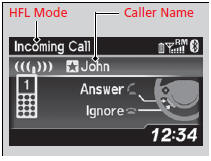
When there is an incoming call, an audible notification sounds (if activated) and the Incoming Call screen appears.
Press the  button to answer
the call.
Press the
button to answer
the call.
Press the  button to decline
or end the call.
button to decline
or end the call.
Receiving a Call
Call Waiting
Press the  button to put the
current call on hold to
answer the incoming call.
Press the
button to put the
current call on hold to
answer the incoming call.
Press the  button again to return to
the current
call.
Ignore the incoming call if you do not want to answer
it.
Press the
button again to return to
the current
call.
Ignore the incoming call if you do not want to answer
it.
Press the  button if you want to
hang up the
current call.
button if you want to
hang up the
current call.
See also:
Checking Tires
To safely operate your vehicle, your tires must be of the proper type and
size, in
good condition with adequate tread, and properly inflated.
Inflation guidelines
Properly inflated tires provide ...
Fog Light Bulbs*
When replacing, use the following bulbs.
Fog Light: 55 W (H11)
1. Remove the screw using a Phillips-head
screwdriver.
The screw does not drop.
Fog Light Bulbs*
NOTICE
Halogen bulbs get very h ...
Airbag Care
You do not need to, and should not, perform any maintenance on or replace any
airbag system components yourself. However, you should have your vehicle
inspected by a dealer in the following situatio ...
