
Maintenance Minder TM
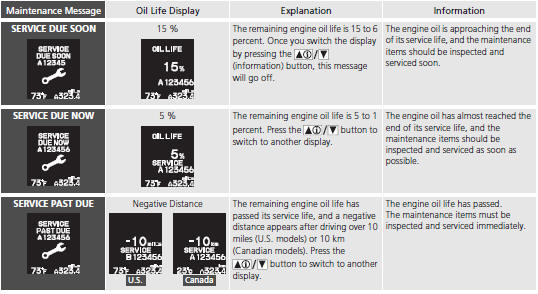
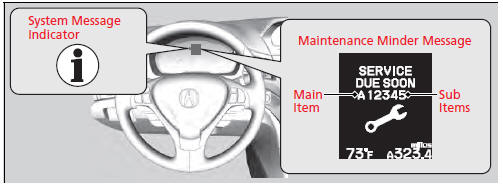
If the engine oil life is less than 15%, you will see the Maintenance Minder messages appear the multi-information display every time you set the power mode to ON. The messages notify you when to change the engine oil, or when to bring your vehicle to a dealer for indicated maintenance services.
To Use Maintenance MinderTM
Displaying the Engine Oil Life and Maintenance Items
Maintenance items, which should be serviced at the same time that you replace the engine oil, appear on the multi-information display. You can view them on the engine oil life screen at any time.
1. Set the power mode to ON.
2. Press the  button repeatedly until the engine oil life appears on the multiinformation display.
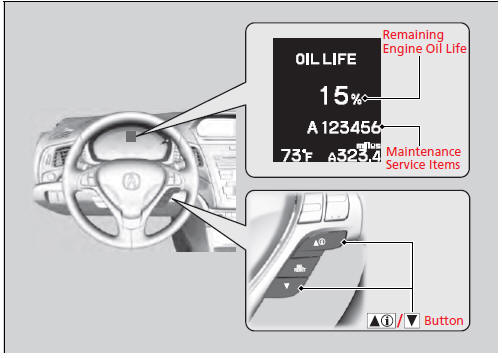
Displaying the Engine Oil Life and Maintenance Items
Based on the engine operating conditions, the remaining engine oil life is calculated and displayed as a percentage.
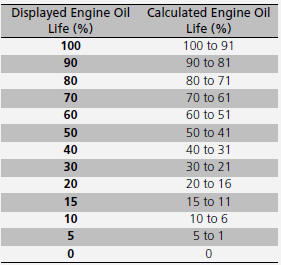
There is a list of maintenance main and sub items you can view on the multi-information display.
Maintenance Minder Messages on the Multi-Information Display
Maintenance Service Items
Maintenance Service Items
• Independent of the Maintenance Minder information, replace the brake fluid every 3 years. • Inspect idle speed every 160,000 miles (256,000 km). • Adjust the valves during services A, B, 1, 2, or 3 if they are noisy.
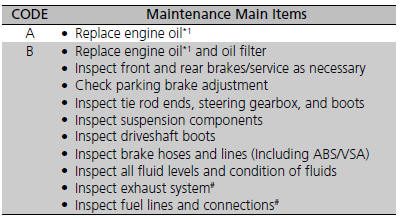
*1: If a message SERVICE does not appear more than 12 months after the display is reset, change the engine oil every year. # : See information on maintenance and emissions warranty.
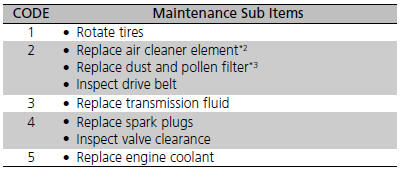
*2: If you drive in dusty conditions, replace the air cleaner element every 15,000 miles (24,000 km). *3: If you drive primarily in urban areas that have high concentrations of soot in the air from industry and from diesel-powered vehicles, replace the dust and pollen filter every 15,000 miles (24,000 km).
Resetting the Display
Reset the engine oil life display if you have performed the maintenance service.
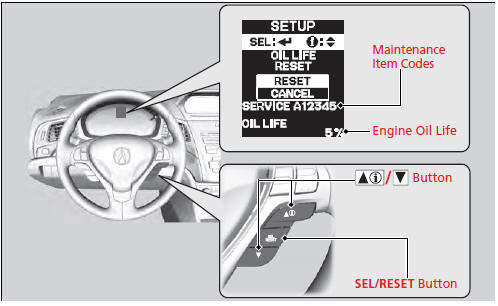
1. Set the power mode to ON.
2. Go to the MAINTENANCE INFO. group.
3.Press the SEL/RESET button.
- The oil life reset mode is displayed on the multi-information display.
4. Select RESET with the  button, then press the SEL/RESET button.
- The displayed maintenance items disappear, and the engine oil life display returns to 100%.
To cancel the oil life reset mode, select CANCEL, then press the SEL/RESET button.
Resetting the Display
NOTICE
Failure to reset the engine oil life after a maintenance service results in the system showing incorrect maintenance intervals, which can lead to serious mechanical problems. The dealer will reset the engine oil life display after completing the required maintenance service. If someone other than a dealer performs maintenance service, reset the engine oil life display yourself.
See also:
Using the Trunk Opener
Pulling the trunk release to the lower left of
the driver's seat unlocks and opens the trunk.
Locking the trunk opener
You can lock the trunk release with the builtin
key.
Using the Trunk Rel ...
Safe Driving
You can find many safety recommendations throughout this chapter, and
throughout this manual. ...
Installing a LATCH-Compatible Child Seat
A LATCH-compatible child seat can be installed in either of the two outer
rear
seats. A child seat is attached to the lower anchors with either the rigid or
flexible
type of connectors.
1. Loca ...
