
Using the Lock Tab
Locking a door
Push the lock tab forward.
Unlocking a door
Pull the lock tab rearward.
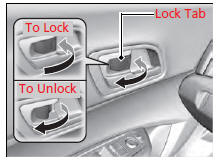
Using the Lock Tab
When you lock the door using the lock tab on the driver's door, all the other doors lock at the same time. When you unlock the door using the lock tab on the driver's door, only the driver's door will unlock.
See also:
Checking the Battery
The battery condition is being monitored by the sensor on the negative
terminal. If
there is a problem with the sensor, the warning message on multi-information
display will let you know. Have you ...
Protecting Child Passengers
Each year, many children are injured or killed in vehicle crashes because
they are
either unrestrained or not properly restrained. In fact, vehicle accidents are
the
number one cause of death of ...
Options During a Call
The following options are available during a call.
Mute: Mute your voice.
Transfer Call: Transfer a call from HFL to your phone.
Touch Tones: Send numbers during a call. This is useful when you cal ...
