
Fastening a Seat Belt
After adjusting a front seat to the proper position, and while sitting upright and well back in the seat:
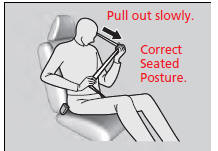
1. Pull the seat belt out slowly.
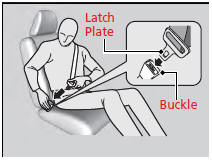
2. Insert the latch plate into the buckle, then tug on the belt to make sure the buckle is secure.
- Make sure that the belt is not twisted or caught on anything.
Fastening a Seat Belt
No one should sit in a seat with an inoperative seat belt or one that does not appear to be working correctly. Using a seat belt that is not working properly may not protect the occupant in a crash. Have a dealer check the belt as soon as possible. Never insert any foreign objects into the buckle or retractor mechanism.
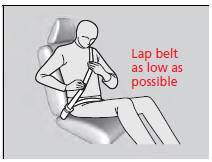
3. Position the lap part of the belt as low as possible across your hips, then pull up on the shoulder part of the belt so the lap part fits snugly. This lets your strong pelvic bones take the force of a crash and reduces the chance of internal injuries.
4. If necessary, pull up on the belt again to remove any slack, then check that the belt rests across the center of your chest and over your shoulder. This spreads the forces of a crash over the strongest bones in your upper body.
Fastening a Seat Belt
WARNING
Improperly positioning the seat belts can cause serious injury or death in a crash. Make sure all seat belts are properly positioned before driving.
To release the belt, push the red PRESS button then guide the belt by hand until it has retracted completely. When exiting the vehicle, be sure the belt is out of the way and will not get caught by closing the door.
See also:
Tire and Loading Information Label
The label attached to the driver’s doorjamb provides necessary tire and
loading information.
Tire and Loading Information Label
The tire and loading information label attached to the
driver’ ...
Side Airbag Off Indicator
When the side airbag off indicator comes on
This indicator comes on if the passenger's side airbag has been turned off
because
the passenger is too small to be sitting in the front seat, is slou ...
Power Door Mirrors
You can adjust the door mirrors when the
power mode is in ON.
Mirror position adjustment
L/R selector switch: Select the left or right
mirror. After adjusting the mirror, return the
switch to t ...
