
Wipers and Washers
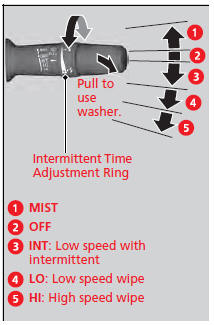
The windshield wipers and washers can be used when the power mode is in ON.
MIST
The wipers run at high speed until you release the lever.
Wiper switch (OFF, INT, LO, HI)
Change the wiper switch setting according to the amount of rain.
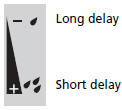
Adjusting the delay
Turn the adjustment ring to adjust the wiper delay.
Washer
Sprays while you pull the lever toward you. When you release the lever, the wipers make two or three more sweeps before stopping.
Wipers and Washers
NOTICE
Do not use the wipers when the windshield is dry. The windshield will get scratched, or the rubber blades will get damaged.
NOTICE
In cold weather, the blades may freeze to the
windshield, becoming stuck.
Operating the wipers in this condition may damage
the wipers. Use the defroster to warm the
windshield, then turn the wipers on.
If the vehicle speeds up while the wipers are
operating intermittently, the length of the wipe
interval shortens.
When the vehicle starts moving, the wipers make a
single sweep.
When the vehicle speeds up, the wiper operation’s
shortest delay setting  and the LO
setting become
the same.
Turn the washers off if no washer fluid comes out.
The pump may get damaged.
The wiper motor is equipped with a breaker that may
stop motor operation temporarily to prevent an
overload. Wiper operation will return to normal
within a few minutes, once the circuit has returned to
normal.
and the LO
setting become
the same.
Turn the washers off if no washer fluid comes out.
The pump may get damaged.
The wiper motor is equipped with a breaker that may
stop motor operation temporarily to prevent an
overload. Wiper operation will return to normal
within a few minutes, once the circuit has returned to
normal.
See also:
Rear Seat
Folding Down the Rear Seat
1. Remove the center shoulder belt from
the guide.
2. Pull the release lever in the trunk to release
the lock.
3. Fold the seat-back down.
If the rear head restr ...
Side Curtain Airbags
The side curtain airbags help protect the heads of the driver and passengers
in outer
seating positions during a moderate-to-severe side impact. ...
Maintenance
This chapter discusses basic maintenance.
...
