
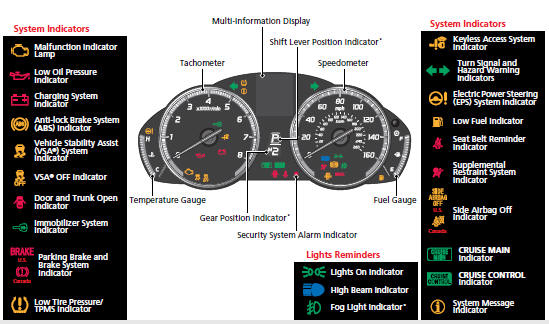
Instrument Panel
Gauges (P 78)/Multi-Information Display (P 79)/System Indicators (P 64)
See also:
Protecting Larger Children-Final Checks
Your vehicle has a rear seat where children can be properly restrained. If you ever have to carry a group of children, and a child must ride in front: • Make sure you read and fully understand t ...
If the Low Oil Pressure Indicator Comes On
Reasons for the indicator to come on
Comes on when the engine oil pressure is low.
What to do as soon as the indicator comes on
1.Immediately park the vehicle in a safe place.
2. If necessary, t ...
Adding Security with a Tether
A tether anchorage point is provided
behind each rear seating position. A child
seat that is installed with a seat belt and
comes with a tether can use the tether for
additional security.
1. Lo ...
