
Remote Transmitter Care
Replacing the Button Battery
If the indicator does not come on when the button is pressed, replace the battery.
Battery type: CR2032
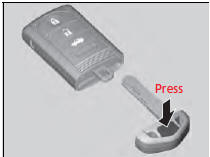
1. Remove the built-in key.
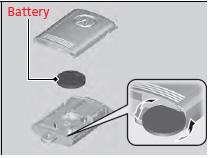
2. Remove the upper half by carefully prying on the edge with a coin.
- Wrap a coin with a cloth to prevent scratching the transmitter.
3.Make sure to replace the battery with the correct polarity.
Replacing the Button Battery
NOTICE
An improperly disposed of battery can damage the environment. Always confirm local regulations for battery disposal. Replacement batteries are commercially available or at a dealer.
See also:
Daytime Running Lights
The high beam headlights come on slightly dimmer than normal when the
following
conditions have been met:
•
The power mode is in ON.
•
The headlight switch is off, or in .
•
The parkin ...
Driving
Manual Transmission
Automatic Transmission
● Shift to and depress the brake
pedal when starting
the engine.
● Shifting
Park
Turn off or start the engine.
Transmission is locke ...
Safety When Performing Maintenance
Some of the most important safety precautions are given here.
However, we cannot warn you of every conceivable hazard that can arise in
performing maintenance. Only you can decide whether or not you ...
