
Compatible iPod®, iPhone®, and USB Flash Drives
iPod® and iPhone® Model Compatibility
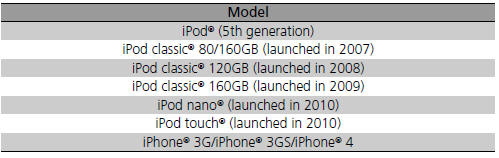
iPod® and iPhone® Model Compatibility
This system may not work with all software versions of these devices.
USB Flash Drives
• Use a recommended USB flash drive of 256 MB or higher. • Some digital audio players may not be compatible. • Some USB flash drives (e.g., a device with security lockout) may not work. • Some software files may not allow for audio play or text data display. • Some versions of MP3, WMA, or AAC formats may be unsupported.
USB Flash Drives
Files on the USB flash drive are played in their stored order. This order may be different from the order displayed on your PC or device.
See also:
Climate Control System
● Press the AUTO button to activate the climate control system.
● Press the button to turn the
system on or off.
● Press the button to defrost the
windshield.
On models with ...
Brake Light, Taillight, Rear Turn Signal Light and Rear Side Marker Light Bulbs
When replacing, use the following bulbs.
Brake/Rear Side Marker/Taillight: 21/5 W
Rear Turn Signal Light: 21 W
1. Pry on the edge of the cover using a flat-tip screwdriver to remove the cover.
& ...
DOT Tire Quality Grading (U.S. Vehicles)
The tires on your vehicle meet all U.S. Federal Safety Requirements. All
tires are
also graded for treadwear, traction, and temperature performance according to
Department of Transportation (DOT) ...
