
Pandora®
U.S. models
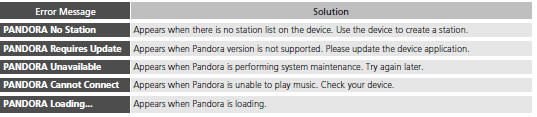
If an error occurs while playing Pandora®, you may see the following error messages. If you cannot clear the error message, contact a dealer.
See also:
USB Adapter Cable
1. Unclip the USB connector and loosen the
adapter cable.
2. Install the iPod® dock connector or the USB
flash drive to the USB connector.
USB Adapter Cable
• Do not leave the iPod® or USB ...
Side Airbags
The side airbags help protect the upper torso of the driver or a front
passenger
during a moderate to severe side impact. ...
How the Front Airbags Work
While your seat belt restrains your torso, the front airbag provides supplemental protection for your head and chest. The front airbags deflate immediately so that they won't interfere with the driver ...
