
CD Player
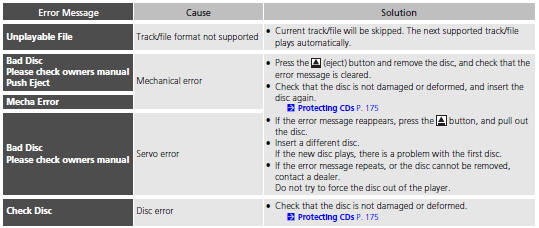
If a disc error occurs, you may see the following error messages.
See also:
Audio System Basic Operation
To use the audio system function, the power mode must be in ACCESSORY or ON.
Use the selector knob or SETUP button to
access some audio functions.
Press to switch between the
normal and
exten ...
Synchronized Mode
You can set the temperature synchronously for the driver side and the
passenger
side in synchronized mode.
1. Press the SYNC button.
- The system will switch to synchronized mode.
2. Adj ...
Brake Light, Taillight, Rear Turn Signal Light and Rear Side Marker Light Bulbs
When replacing, use the following bulbs.
Brake/Rear Side Marker/Taillight: 21/5 W
Rear Turn Signal Light: 21 W
1. Pry on the edge of the cover using a flat-tip screwdriver to remove the cover.
& ...
